Managing Deleted Orders
Jump to navigation
Jump to search
The Deleted Orders report provides a detailed record of all orders removed from the system. This guide explains how to access, review, and search deleted order data in the admin area.
Watch the video first—it gives you the full details.
OR refer to the manual below.
1) Accessing Deleted Orders Reports
- Log in to the Admin area of your website.
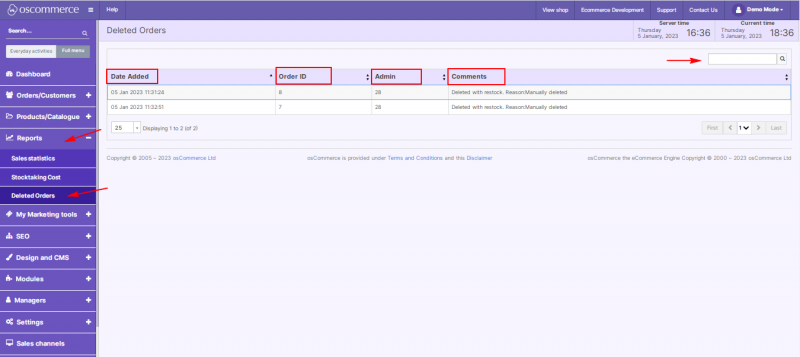
- Navigate to Reports → Deleted Orders.
2) Viewing Reports
- Under this tab, the system automatically generates Deleted Orders reports.
- Reports are displayed in a table format with the following columns:
- Date Added – exact date and time when an order was deleted.
- Order ID – the unique identifier of the deleted order.
- Admin – ID of the administrator who deleted the order.
- Comments – notes or comments related to the deleted order.
3) Searching Reports
- Use the Quick search field above the table to quickly find specific deleted orders by keywords or IDs.