Managing SEO
Jump to navigation
Jump to search
This manual explains how to manage SEO settings for meta tags, products, and categories in your website’s admin area.
1) Managing Meta Tags
- Log in to the Admin Area of your website.
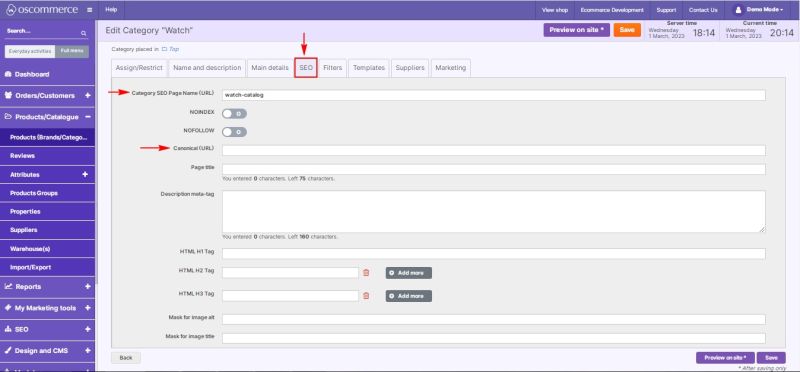
- Navigate to SEO → Meta Tags. See also Managing Meta Tags
- Select the required tab (e.g., Index Tags, All Products, etc.). If needed, scroll the tab bar to the right to locate more sections.
- Select the required frontend by clicking the corresponding tab.
- You can:
- View or edit Heading Title, Heading Description and HTML H1 tags.
- Add multiple HTML H2, H3 tag fields using the Add more button.
- Delete fields using the trash icon.
2) Managing SEO for Products
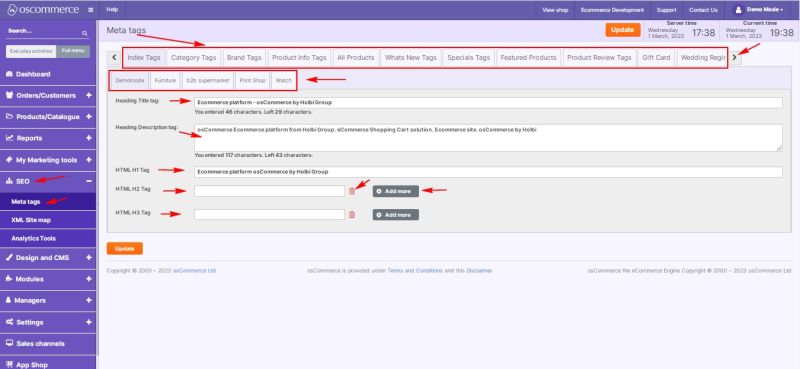
- When adding or editing a product, open the SEO tab.
- Select the required frontend by clicking on the corresponding tab.
- In the SEO Page Name field, enter how the product URL should appear in the browser, after the domain. Example:
- Page name:
casio-general-men-s-watches-edifice-digital-analog-combination - URL:
https://yourwebsite/casio-general-men-s-watches-edifice-digital-analog-combination
- Page name:
Note: The Canonical (URL) field should not be filled in.
3) Managing SEO for Categories
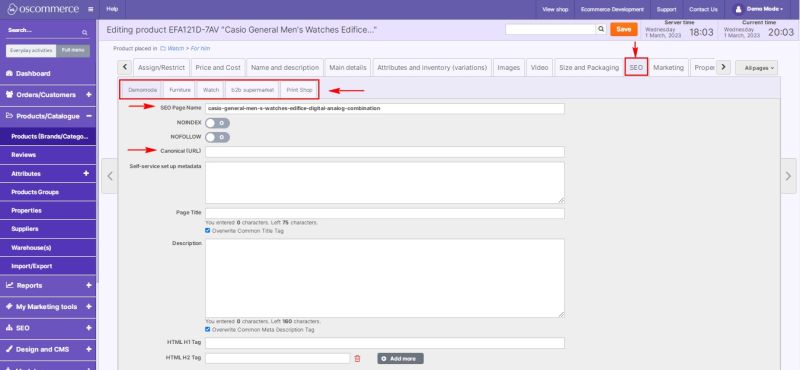
- When adding or editing a category, open the SEO tab.
- Enter the URL name in the Category SEO Page Name (URL) field. Example:
- Page name:
watch-catalog - URL:
https://yourwebsite/watch-catalog
- Page name:
Note: The Canonical (URL) field should not be filled in.