Managing Virtual Gift Card
Jump to navigation
Jump to search
This manual explains how to create, configure, and offer virtual gift cards for customers to purchase and send.
For a quick overview of this functionality, watch the video first.
For detailed instructions, please refer to the manual below.
1) Access the Admin Area
- Log in to the Admin Area of your website.
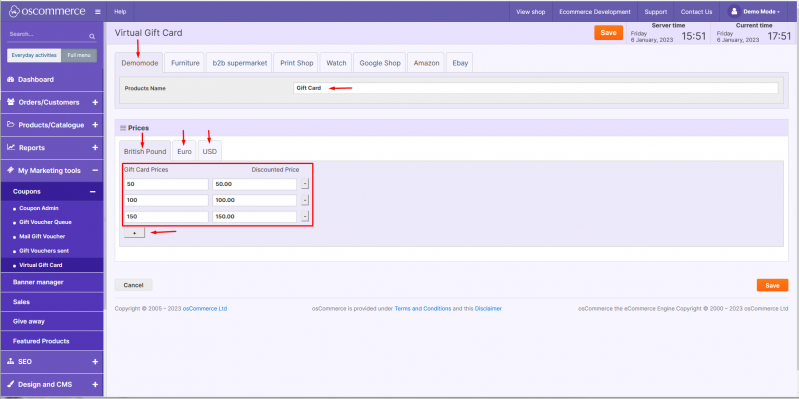
- Navigate to My Marketing Tools → Coupons → Virtual Gift Card.
2) Create Gift Card Amounts
- Under the Virtual Gift Card tab, create a new gift card amount.
- Enter the gift card value.
- Set the gift card price and discounted price.
- Select the sales channel (if applicable).
- Choose the currency for this gift card.
- Save your changes.
3) Customer Experience on the Front End
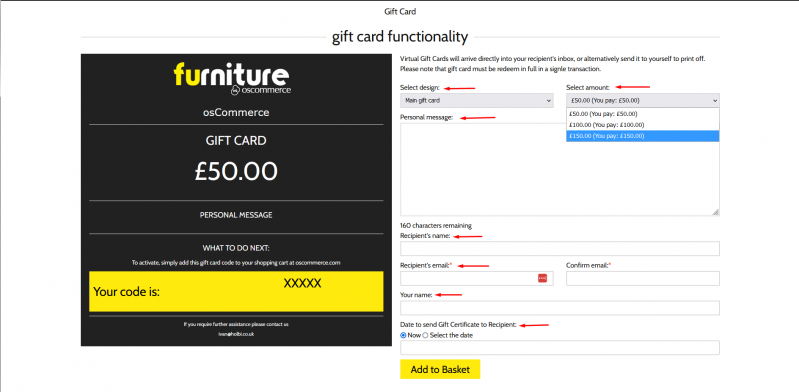
1. Once configured, the gift card is available for purchase at:
yourwebsite/catalog/gift-card
2. Customers can:
- Select a gift card design.
- Choose a gift card amount from the dropdown.
- Write a personal message.
- Enter the recipient’s name and email address.
- Enter the sender’s name.
- Select a date for the gift card to be delivered to the recipient.