Managing XML Sitemap
Jump to navigation
Jump to search
This manual explains how to manage XML sitemaps in the admin area of your website.
1) Access the XML Sitemap Section
- Log in to the Admin Area of your website.
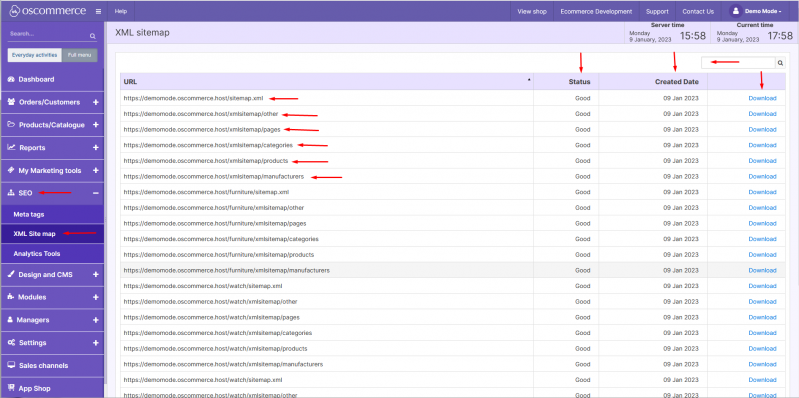
- Navigate to SEO → XML Sitemap.
2) Working with XML Sitemaps
In this section you can view and manage automatically generated sitemaps used by search engines to index your site structure.
You can:
- Search for a sitemap using the quick search field.
- View the status of each sitemap.
- Check the date when each sitemap was last created.
- Download a sitemap by clicking on the corresponding action button.
3) Sitemap Types Available
Typical sitemap files include:
| Sitemap Type | Description |
|---|---|
| sitemap.xml | Main sitemap index that links to all other sitemap files. |
| /xmlsitemap/products | Contains links to all product pages. |
| /xmlsitemap/categories | Contains links to all category pages. |
| /xmlsitemap/manufacturers | Contains links to brand/manufacturer pages. |
| /xmlsitemap/pages | Contains links to standard content pages (e.g., About, Contact). |
| /xmlsitemap/other | Contains links to additional indexable pages if configured. |
You have now successfully reviewed how to manage XML sitemaps to support search engine indexing.